Flyover
A sound flies past you like a plane overhead
Flyover turns each note or hit into a "flying object" that streaks past the listener. When the input crosses an onset threshold, a timed pass is launched: a virtual source travels in a straight line at a set speed, getting louder as it approaches, swelling wide as it sweeps overhead, then flipping to the opposite side and fading as it recedes. You hear an approach-and-depart whoosh with the image rushing across the ring, the apparent size of the sound ballooning to surround you at the closest point, and the bearing snapping 180 degrees behind you once it has passed. (It is a level-and-width swell, not a pitch effect - there is no Doppler pitch-shift.) It is transient-reactive: percussive or staccato material triggers the most dramatic, repeated fly-bys.
How to use it
- Feed it transients. Flyover is triggered by note onsets, so it shines on drums, plucks, mallets, vocal consonants and other percussive sources. Sustained pads will trigger one pass and then sit idle until the next clear attack.
- Tune the trigger first. If passes won't start, lower Onset Threshold (try 6-9 dB) so a smaller jump above the noise floor fires it, and/or lower Min Threshold (e.g. -80 dBFS) so quieter material isn't gated out. If it keeps re-triggering on noise, raise Onset Threshold and raise Min Threshold (e.g. -40 dBFS) so the noise floor stays below the absolute gate and is ignored.
- Set the journey length with Duration, the rush with Speed. A short Duration (1-4 s) with high Speed (800-1500 MPH) gives a fast, dramatic whoosh; a long Duration (20-60 s) with low Speed gives a slow, distant drift-by.
- Height controls how close it comes. Low Height (1-10 m) makes the object pass nearly on top of you, so it gets very loud and very wide at the centre; large Height keeps it far and tame, smoothing the level swell.
- Source Width sets how wide the swell gets and where it happens. It scales the approach/depart "edges": small values keep a narrow point that only briefly balloons at the closest point; larger values stretch the widening over more of the pass.
- Direction aims the flight path. 0 = front/centre, 90 = left, 180 = back, 270 = right (counter-clockwise). The object approaches from your chosen bearing and exits 180 degrees opposite.
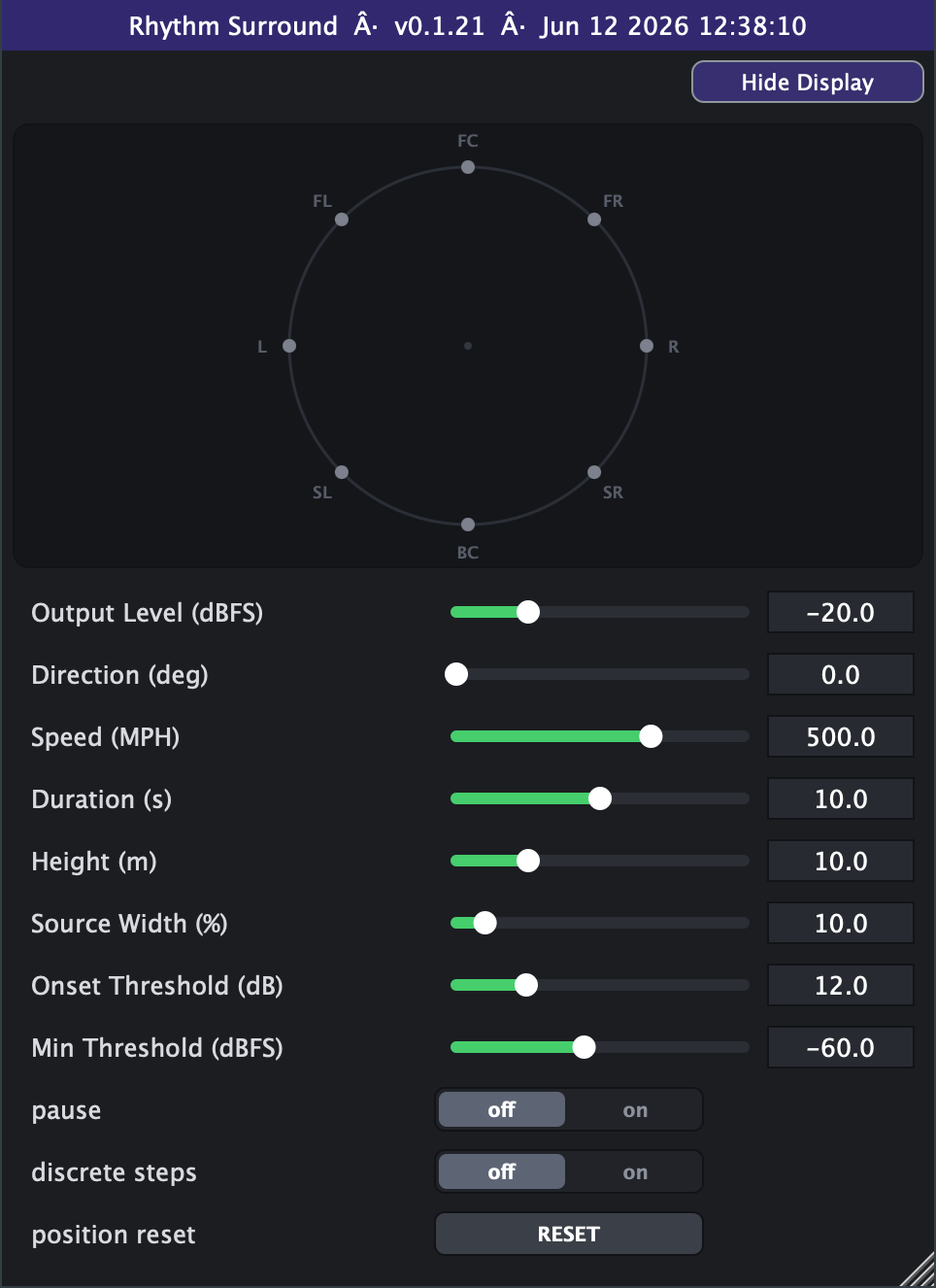
- Good starting point: Direction 0, Speed ~500 MPH, Duration ~10 s, Height ~10 m, Source Width ~10%, Onset Threshold 12 dB, Min Threshold -60 dBFS.
- discrete steps quantises the motion to the 8 fixed speaker positions (45-degree snaps) for a stepped, teleporting feel instead of a smooth glide.
- pause freezes the current pass in place; position reset aborts any pass in flight and is the only event that is click-smoothed, so use it freely to retrigger cleanly.
- GUI moves only take effect between passes - change Speed, Duration, Height etc. while idle; tweaks made mid-flight are applied to the next pass, not the current one.
- Avoid setting Output Level very high together with low Height: the 1/distance gain peaks sharply at the closest point and can spike loud.
Controls
- Output Level
- Overall output volume of the effect. Turn up for a louder pass, down to tame the level peak that occurs when the object is at its closest. Defaults to 0 dB (unity - the distance model already attenuates); the slider range is set on the Advanced tab (default -40 to +20 dB, extendable to -100 to +40 for distant-pass boost).
- Direction
- The bearing the object approaches from (counter-clockwise: 0 = front, 90 = left, 180 = back, 270 = right). It departs 180 degrees opposite after passing.
- Speed
- How fast the virtual object travels. Higher speeds make a faster, more dramatic rush-by; lower speeds drift more gently. Slider range is set on the Advanced tab (default 50-5000 MPH, log-scaled).
- Duration
- How long one fly-by lasts from approach to departure. Short = a quick whoosh, long = a slow distant pass. Slider range is set on the Advanced tab (default 1-100 s, log-scaled).
- Height
- How far overhead the object passes. Low values bring it close (loud, wide swell at the centre); high values keep it distant and even. Slider range is set on the Advanced tab (default 10-1000 m, log-scaled).
- Source Width
- How much, and over what portion of the pass, the image swells wide as the object sweeps overhead. Larger values spread the widening across more of the journey.
- pause
- Freezes the current pass (position, width and gain are held). Turn off to resume normal triggering.
- position reset
- Momentary trigger that aborts any pass in flight and returns to idle, click-smoothed by a de-click window. Use to retrigger cleanly.
- timeline sync (Advanced tab)
- Re-cue switch at the top of the Advanced tab - fly-bys are hit-driven, so they can't be phase-locked. On: a loop wrap or seek aborts any pass in flight (de-clicked) so each loop pass re-triggers and reproduces identically. Off (the default): a pass coasts through the wrap.
- Onset Threshold (Advanced tab)
- How far above the running noise floor an attack must rise to trigger a new pass. Lower = more sensitive (triggers easily); higher = only strong transients fire it.
- Min Threshold (Advanced tab)
- Absolute floor below which input is ignored. Raise it to keep low-level noise or hiss from triggering passes; lower it to let quieter material through.
- Advanced range settings
- Output Level's slider spans -40 to +20 dBFS by default, retunable within hard bounds of -100 to +40 dBFS (Flyover keeps extra boost headroom for the distance attenuation at large Heights), always linear in dB. Speed's slider spans 50 to 5000 MPH by default, retunable within hard bounds of 0.1 to 10000 MPH, always log-scaled. Duration's slider spans 1 to 100 s by default, retunable within hard bounds of 0.1 to 1000 s, always log-scaled. Height's slider spans 10 to 1000 m by default, retunable within hard bounds of 1 to 20000 m, always log-scaled. Min can never exceed max, and the range settings only reshape the on-screen sliders and save with your session or preset.
- discrete steps (Advanced tab)
- Quantises the motion to the 8 fixed speaker positions (45-degree snaps) for a stepped, teleporting movement instead of a smooth glide.