Static · breathing width
Position
Park a sound in the ring and let its width breathe in place
Position places your mono source at a fixed angle on the 8-speaker ring around the listener and then animates how WIDE that source feels. Instead of moving around the ring, the sound stays put while its spatial spread grows and shrinks (breathes) between a starting and ending width. At zero width it is a tight point; as the width opens up the source fans out into many virtual sources spanning more of the ring, so you hear it expand outward from a point, optionally bouncing back and forth or snapping shut and reopening. The centre never drifts — it is a focused location whose size is alive.
How to use it
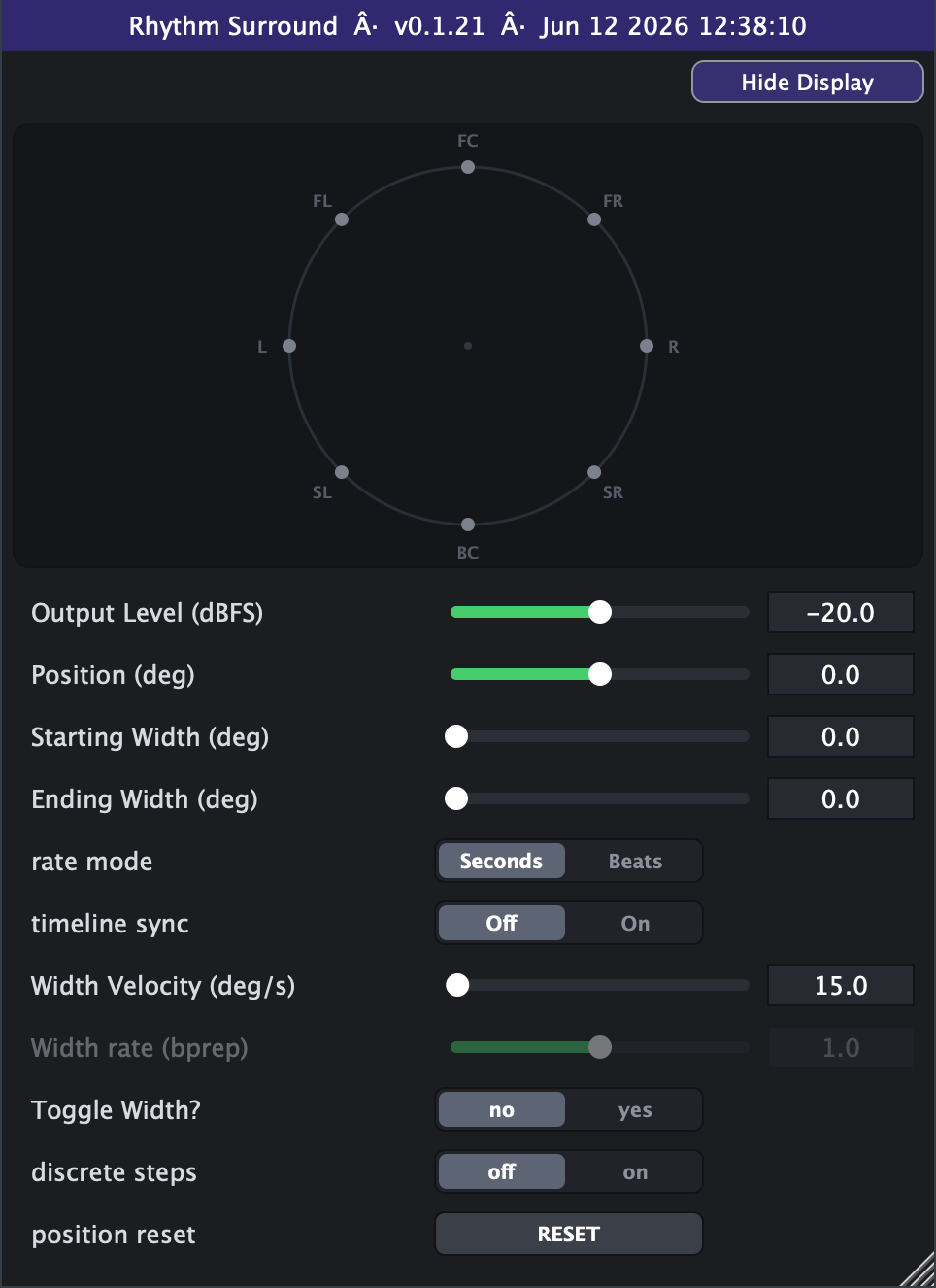
- Pin the location first. Set Position (deg) to where you want the sound anchored (0 = front/centre, 90 = left, 180 = behind, 270 = right). This angle does not move — only the width animates.
- To get motion you must give the width something to travel. Set Starting Width and Ending Width to *different* values. If Start = End (both the default 0) the image is a static point and nothing breathes.
- Gentle pulsing breath: try Start 0, End ~90, Width Velocity ~15-30 deg/s with Toggle Width? = yes so it smoothly bounces open and closed instead of snapping.
- Sharp re-trigger feel: keep Toggle Width? = no — the width sweeps Start to End then snaps instantly back to Start and reopens (a sawtooth), good for rhythmic "swells".
- Dial the speed: Width Velocity is in degrees of width per second. Small values (10-30) breathe slowly; large values flutter very fast (the slider spans 0-720 deg/s out of the box; the Advanced tab can extend it to 10000). To sync the breath to your song, switch rate mode to Beats and use Width rate (bprep) — the breath then crosses the Start to End span in that many beats at the host tempo.
- Lock it to the timeline: turn timeline sync = On (it sits at the top of the Advanced tab) so the breathing phase follows the playhead — seeks, loops and stop/start keep the width where the song says it should be (use Beats mode for bar-aligned, tempo-independent breathing).
- discrete steps = on quantises each virtual source to the nearest physical speaker (45 deg jumps) instead of placing it smoothly between them — a chunkier, more "stepped" spatial texture. Leave it off for smooth panning.
- Restart the breath any time with the position reset button — it snaps the width back to the Start value and begins again, handy for lining the swell up with a downbeat.
- Watch your level. As width grows the plugin auto-compensates loudness, but Output Level still sets the overall ceiling — start around -20 dBFS and raise to taste.
- Avoid: expecting orbiting motion — that is Twirl's job. Position only moves the *size* of the image, not its location.
Controls
- Output Level (dBFS)
- Overall output level of the positioned sound. Lower = quieter. Loudness compensation for width is applied on top of this, so it sets the ceiling. Slider range is set on the Advanced tab (default -40..0 dB; extendable to -100..+20).
- Position (deg)
- The fixed centre angle on the ring where the sound is anchored. 0 = front/centre, 90 = left, 180 = behind, 270 = right (counter-clockwise). This does not move; only the width breathes around it.
- Radius
- Pulls the anchored point in from the speaker ring toward the centre. 1 sits it out on the ring (the classic placement); lower values move the breathing image into the interior of the room, closer to you.
- Starting Width (deg)
- The narrow end of the breath. 0 is a tight point source; larger values fan the sound across more of the ring. Must differ from Ending Width for any motion.
- Ending Width (deg)
- The wide end of the breath. The image sweeps between Starting and Ending Width. Default 0 (equal to Start) means a static point with no breathing.
- rate mode
- Chooses how the breathing speed is set. Seconds uses Width Velocity (deg/s) directly. Beats derives the speed from Width rate and the host tempo so it follows your project's BPM.
- Width Velocity (deg/s)
- Speed of the width breath in Seconds mode: degrees of width travelled per second. Low values breathe slowly; high values flutter fast. Active only when rate mode = Seconds. Slider range is set on the Advanced tab (default 0-720).
- Width rate (bprep)
- In Beats mode, the number of beats taken to cross the Start-to-End width span at the host tempo. Smaller = faster breath, larger = slower. Active only when rate mode = Beats. Slider range is set on the Advanced tab (default 0.1-16, log).
- Toggle Width?
- no = sawtooth: width sweeps Start to End then snaps instantly back to Start. yes = triangle bounce: width smoothly reverses at each limit, breathing open and closed.
- position reset
- Momentary button: on a press it snaps the breathing width back to the Starting Width and restarts the sweep. Useful for lining the swell up with a downbeat.
- timeline sync (Advanced tab)
- Sits at the top of the Advanced list. Off = free-running breath. On = the breathing phase is locked to the host playhead, so seeks, loops and stop/start keep the width aligned to the timeline (bar/beat-aligned in Beats mode, second-aligned in Seconds).
- Advanced range settings
- Output Level: slider window defaults to -40..0 dBFS, adjustable within hard bounds of -100 to +20 dB (raising the max above 0 gives up to 20 dB of boost); always linear in dB, with no scale switch. Width Velocity: window defaults to 0-720 deg/s with the max raisable to a hard ceiling of 10000, plus a linear (default) or log scale switch — the log curve runs from 0.1 upward so the slider's far-left position still lands exactly on 0. Width rate: window defaults to 0.1-16 beats within hard bounds of 0.01 to 1024, with a log (default) or linear scale switch. Min can never exceed max on any pair, and these settings only reshape the on-screen sliders — automation and the actual parameter values are unaffected — and they save with your session or preset.
- discrete steps (Advanced tab)
- off = smooth panning between speakers. on = each virtual source snaps to the nearest physical speaker (45 deg quantisation) for a chunkier, stepped spatial texture.