Continuous orbit
Twirl
Orbit a sound around the listener
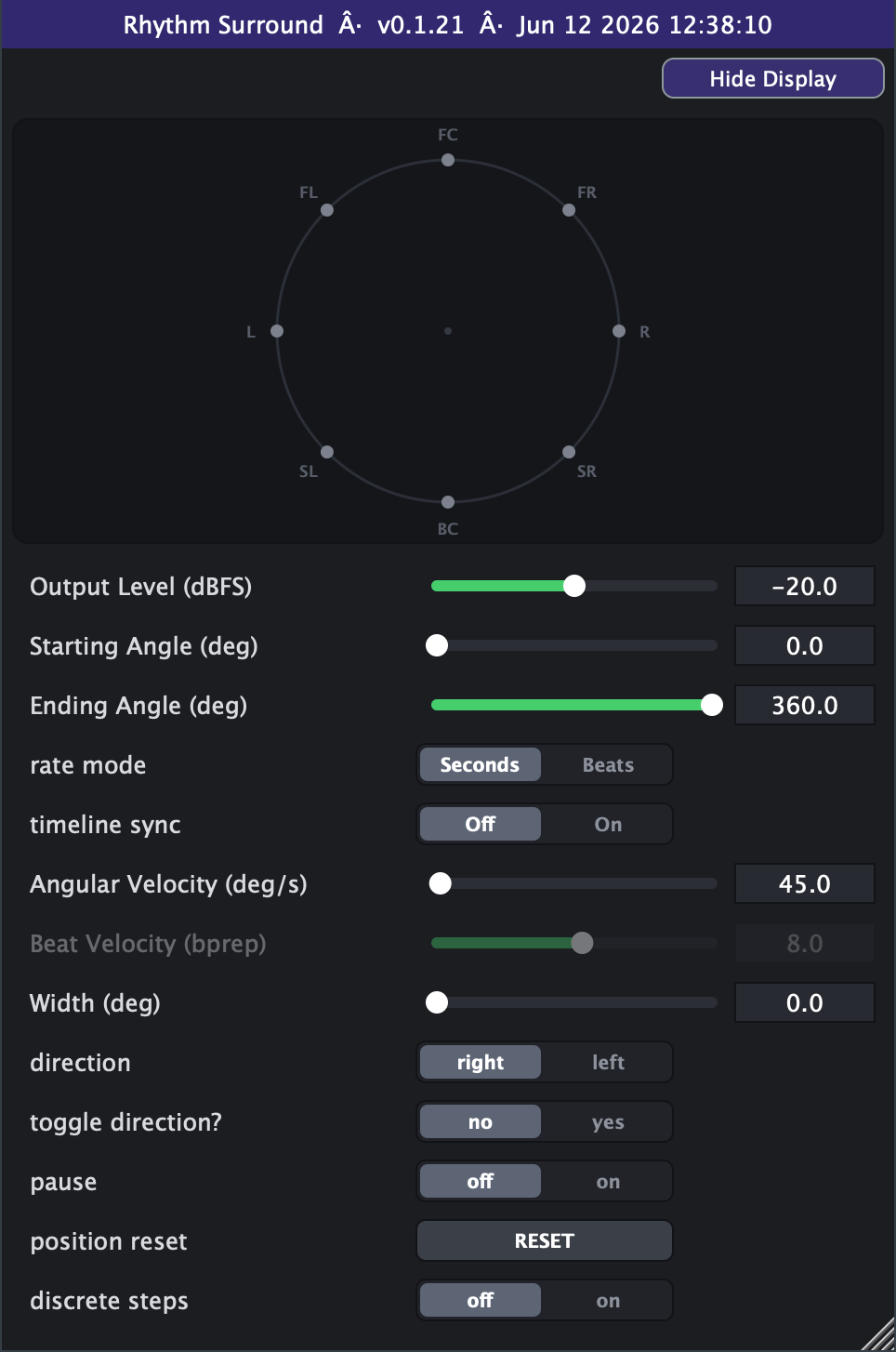
Twirl takes a single mono sound and spins it around you on a ring of 8 speakers, so the source travels in a circle through the whole horizontal soundstage - front, left, back, right and around again. You set where the orbit begins and ends, how fast it travels and which way it goes, and the source glides continuously through those positions (or steps speaker-to-speaker if you want a chunkier, jumpy motion). You can keep it spinning forever, sweep back and forth between two points, freeze it in place, or snap it back to the start on demand. A Width control lets the spinning source bloom from a tight point into a wide arc of sound.
How to use it
- Classic full spin: leave Starting Angle at 0deg and Ending Angle at 360deg for an unbroken continuous orbit - the source loops smoothly with no snap-back. Start with Angular Velocity around 45-90 deg/s for a musical, noticeable swirl.
- Sync the spin to your song: switch Rate Mode to *Beats* and dial Beat Velocity in beats-per-revolution (default 8 = one full lap every 8 beats / two bars in 4/4). The orbit speed then follows your project tempo automatically - great for tempo changes.
- Lock it to the timeline: turn Timeline Sync *On* (on the Advanced tab) so the orbit's position is tied to the playhead. Seeks, loops and stop/start jump the sound to the right spot every time - essential for repeatable mixes and automation passes. Leave it *Off* for a free-running, never-quite-repeating swirl.
- Sweep a section instead of a full circle: set Starting and Ending Angles to two points (e.g. 90deg left to 270deg right) for a partial arc that snaps back and repeats. Add *Toggle direction = yes* to make it bounce back and forth between the two points instead of snapping.
- Wide vs pinpoint: keep Width at 0deg for a tight, clearly-localised point that orbits cleanly. Raise Width for a fatter, more enveloping smear of sound that still rotates - high Width values (>180deg) become very diffuse, almost surrounding.
- Robotic stepping: turn *Discrete steps = on* to make the source hop speaker-to-speaker in 45deg increments instead of gliding - good for rhythmic, mechanical movement.
- Performance moves: use *Pause = on* to freeze the sound exactly where it is, and the momentary *Position reset* button to snap it back to the Starting Angle (both are click-smoothed). Flip *direction* (CCW/clockwise) for an instant reversal.
- What to avoid: very high Angular Velocity (hundreds to thousands of deg/s) spins so fast the motion blurs into a static, wide image rather than an audible orbit - keep it slow enough to hear the travel. Setting Starting and Ending Angles equal leaves nothing to sweep. Remember this is a mono-in effect: feed it a single source, not a stereo bus.
Controls
- Output Level
- Overall output loudness of the spinning source. Higher = louder. Slider range is set on the Advanced tab (default -40..0 dB; extendable down to -100 and up to +20 dB of boost).
- Starting Angle
- Where the orbit begins on the ring (0=front, 90=left, 180=back, 270=right). With Start at 0 and End at 360 you get a continuous full spin.
- Ending Angle
- Where the sweep ends before snapping back (or turning around in Toggle mode). Together with Starting Angle it defines the arc travelled.
- Radius
- How far out the orbit runs. 1 spins the source around the speaker ring; lower values shrink the circle inward toward the centre for a tighter, more interior orbit.
- rate mode
- Chooses how speed is measured. Seconds = a fixed deg/s set by Angular Velocity. Beats = speed derived from Beat Velocity and the host tempo, so the spin tracks your project's BPM.
- Angular Velocity
- Spin speed in degrees per second (active in Seconds rate mode). 360 deg/s = one full lap per second; higher spins faster. Above a few hundred the motion blurs. Slider range is set on the Advanced tab (default 0-720).
- Beat Velocity
- Spin speed in beats per revolution (active in Beats rate mode). 8 = one full orbit every 8 beats; smaller numbers spin faster, larger numbers slower. Tracks host tempo. Slider range is set on the Advanced tab (default 0.1-400, log).
- Width
- Angular spread of the orbiting source. 0 = a tight point; larger values fan it into multiple virtual sources spanning a wider arc, making the sound fatter and more enveloping (loudness is auto-compensated).
- direction
- Which way the source travels around the ring: CCW (counter-clockwise, the angle climbing 0-90-180) or clockwise. Flipping it instantly reverses the orbit.
- toggle direction?
- no = sweep to the Ending Angle then snap back to Start and repeat. yes = bounce back and forth between Starting and Ending angles (ping-pong), reversing smoothly at each end.
- pause
- on = freeze the source at its current position (no motion). off = orbit normally. Resuming is click-smoothed.
- position reset
- Momentary trigger that snaps the source back to the Starting Angle. Press to jump the orbit to its start; the jump is de-clicked. Fires once per press (rising edge).
- timeline sync (Advanced tab)
- Off = free-running orbit that resumes where it left off. On = orbit position is locked to the host playhead, so seeks, loops and stop/start move the sound to match the timeline (repeatable).
- Advanced range settings
- The Output Level slider defaults to a -40..0 dB window and can be retuned anywhere between -100 and +20 dB (raising the max above 0 gives up to 20 dB of boost), always linear in dB. The Angular Velocity slider defaults to a 0-720 deg/s window with a hard ceiling of 10000, switchable between linear (default) and log scales. The Beat Velocity slider defaults to a 0.1-400 beats-per-revolution window within hard bounds of 0.01 and 1024, switchable between log (default) and linear scales.
- discrete steps (Advanced tab)
- off = smooth continuous glide. on = quantize position to 45deg steps so the source hops speaker-to-speaker for a mechanical, stepped motion.