Mirror sweep
Surf
Sweep a sound across the room like a passing wave
Surf glides your mono sound smoothly across the ring of speakers, from a starting point to an ending point, then repeats - like a wave rolling across the room. A second, mirror-image copy of the sound travels in the opposite direction at the same time, so the two halves spread apart and sweep back together, giving the motion its "wave" feel. You can set how far and how fast it travels, whether it snaps back and repeats or bounces back and forth, and whether the movement is a continuous slide or a series of jumps from speaker to speaker. When the sweep loops back to the start, a short fade hides the click so the repeat stays clean.
How to use it
- Quick start: Width 0, Reflect = no, Step = off, Repetition Period around 4-6 s. You get a clean, continuous wave sweeping across the front half of the room and snapping back to repeat. Drop the Output Level a few dB first - Surf sums two sources, so it can be loud.
- Set the path with the two Position knobs: Starting Position and Ending Position are 0-1 fractions of the sweep. Either way they span the diameter — one crossing across the room — so Start 0 / End 0.5 confines the wave to the near half and 0.5 / 1 to the far half. Keep the defaults (Start 0, End 1) for the widest sweep.
- Aim the wave with Starting Angle: it rotates the whole pattern around you (0 = front, 90 = left, 180 = back, 270 = right). The mirror source reflects about this angle, so it also sets the "seam" where the two halves meet and split.
- Speed it up or down with Repetition Period (seconds per pass). Short values (1-2 s) feel restless and rhythmic; long values (8-15 s) give slow, ambient drifts. Set Rate Mode to Beats to lock the sweep to your project tempo via Beat Period instead.
- Reflect = no vs yes: *no* sweeps one way and snaps back to repeat (a rolling wave). *yes* bounces the wave back and forth between the two positions (a pendulum).
- Tighten or widen the image with Width: 0 is a sharp point that pans cleanly; crank it up to smear each source into a broad band that fills more of the ring.
- Step = on turns the smooth glide into discrete jumps from speaker to speaker (45 deg steps) - good for stuttery, robotic motion. Leave it off for the classic smooth surf.
- Pause = on freezes the wave wherever it is, so you can park the sound and resume later; use the Reset button to snap the sweep back to its start.
- Timeline Sync = On ties the wave's position to your DAW's playhead so seeks, loops and stop/start always land the wave in the same place - ideal for repeatable mixes and automation. Leave it Off for free-running motion.
- Avoid: very short Repetition Periods combined with wide Width can sound chaotic and smear the stereo/surround image; back off one or the other. Also watch overall level when stacking wide Width with high Output Level.
Controls
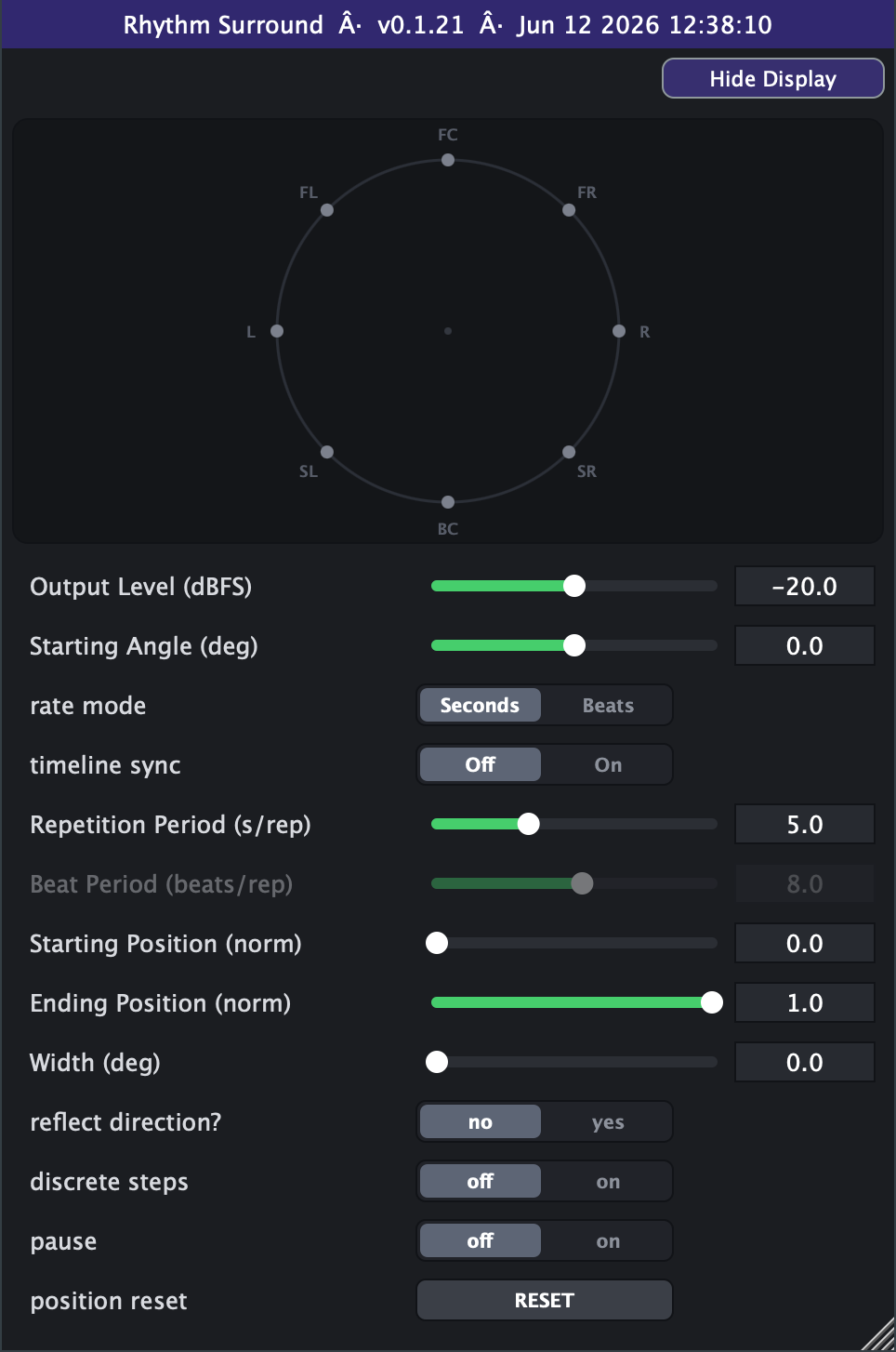
- Output Level (dBFS)
- Overall output volume of the moving sound. Turn down to make room in the mix; the plugin already compensates for the dual mirror source internally. Slider range is set on the Advanced tab (default -40 to 0 dB; extendable to -100 to +20).
- Starting Angle (deg)
- Rotates the whole sweep pattern around you and sets the axis the mirror source reflects about. 0 = front, 90 = left, 180 = back, 270 = right (counter-clockwise).
- rate mode
- Chooses how sweep speed is set: Seconds uses Repetition Period directly; Beats derives it from Beat Period and your host's tempo so the motion locks to the song.
- Repetition Period (s/rep)
- Seconds for one full sweep when Rate Mode = Seconds. Smaller = faster, more rhythmic motion; larger = slow, drifting waves. (Active only in Seconds mode.) Slider range is set on the Advanced tab (default 5-15 s).
- Beat Period (bprep)
- Beats per sweep when Rate Mode = Beats; combined with host tempo to set speed so the wave stays in time with the music. (Active only in Beats mode.) Slider range is set on the Advanced tab (default 8-400, log).
- Starting Position (norm)
- Where the sweep begins, as a fraction of the crossing (the diameter, in both Reflect modes), measured from the Starting Angle.
- Ending Position (norm)
- Where the sweep ends, as a fraction of the travel range. Together with Starting Position this sets how far the wave travels before it snaps back or bounces.
- Width (deg)
- Angular spread of the moving sound. 0 is a sharp point (single pan); higher values fan it into a wider band of up to 10 virtual sources for a bigger, more diffuse image, with automatic loudness compensation.
- reflect direction?
- no = sweep one way over a half-circle and snap back to repeat (rolling wave). yes = travel the full circle (circulate) or, with a limited range, bounce back and forth (pendulum).
- pause
- on freezes the wave at its current position; off lets it move. Useful for parking the sound and resuming the sweep later.
- position reset
- Momentary button: snaps the sweep back to its starting point. A short de-click fade hides the jump.
- timeline sync (Advanced tab)
- On locks the wave's position to the DAW playhead so seeks, loops and stop/start always place it identically; Off lets it free-run. Sits at the top of the Advanced tab.
- Advanced range settings
- Output Level min/max set the ends of the level slider: defaults -40 and 0 dBFS, hard bounds -100 and +20 dB, always linear in dB with no scale switch. Repetition Period min/max/scale retune the period slider: defaults 5 and 15 s, hard bounds 0 and 1000 s, linear by default with a log switch (with the min at 0 the log curve runs from 0.1 upward, but far-left still lands exactly on 0). Beat Period min/max/scale retune the beat slider: defaults 8 and 400 beats/rep, hard bounds 0.01 and 4000, log by default with a linear switch. Min can never exceed max, and these settings only reshape the on-screen sliders - automation is unaffected and they save with your session or preset.
- discrete steps (Advanced tab)
- off = smooth continuous glide. on = the sound jumps in 45 deg steps from speaker to speaker for a stuttery, quantized motion.