PingPong
Volley a sound between opposite speakers, then spin it around the ring
PingPong takes your mono sound and bats it back and forth between two speakers that sit directly opposite each other across the listening circle, like a ball in a game of table tennis. You set where the volley starts and ends, and how fast it crosses, so the sound sweeps from one side of you to the other and back again. On top of that volley you can add "spin": every time the ball returns to the start side it jumps to a new pair of opposite speakers, so the whole back-and-forth motion rotates around you. With Width turned up, several parallel volleys play at once across neighbouring speaker pairs, fattening the image into a moving wall of sound rather than a single point.
How to use it
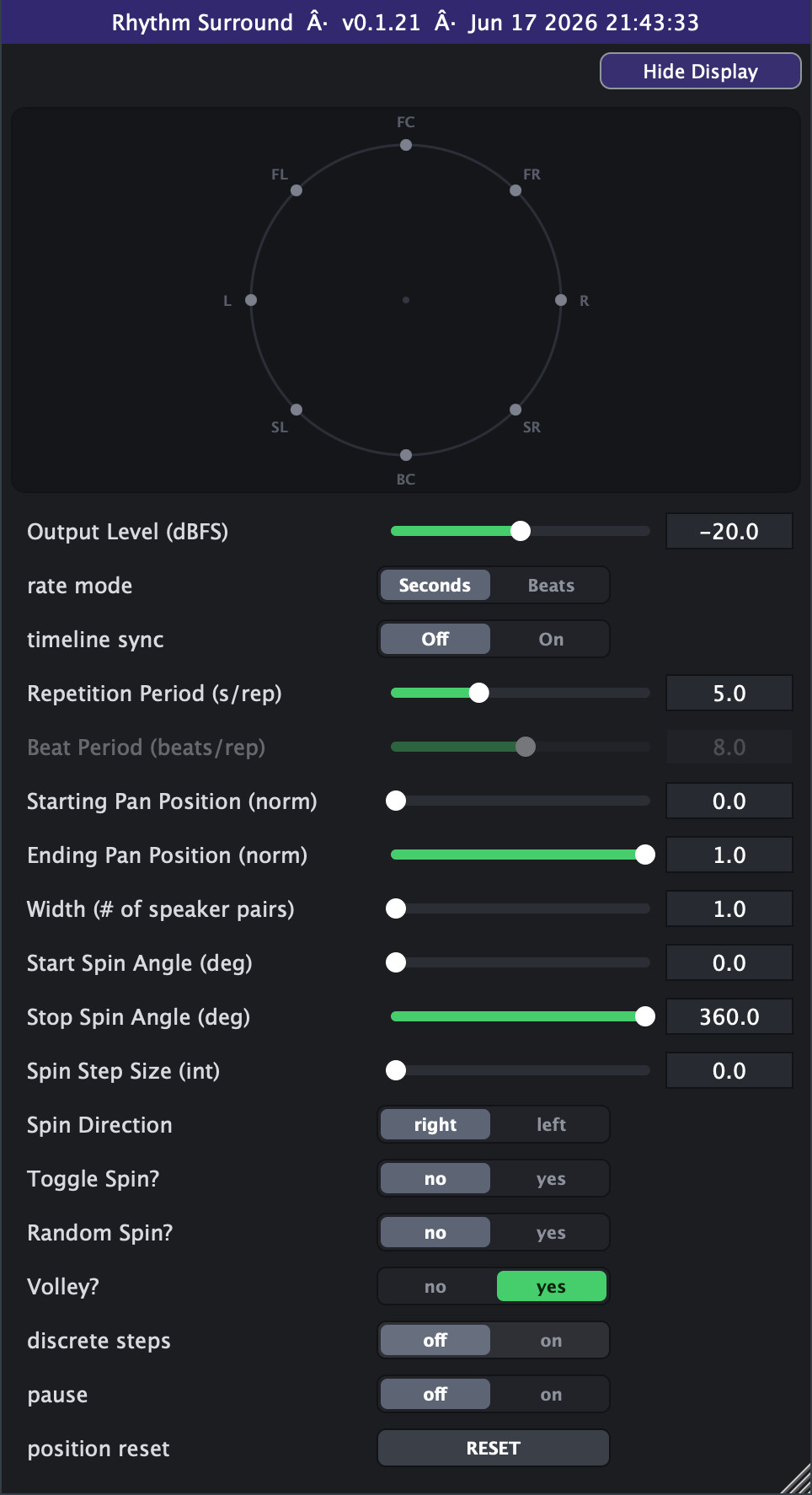
- Hear the basic effect first: leave Volley on (the default), Spin Step at 0, and Width at 1. With Starting Position 0 (front) and Ending Position 1 (back), the sound bounces front-to-back through your head. Set the speed with Repetition Period (try 2-4 s for a clear, musical sweep across the full half-circle).
- Add the spin by raising Spin Step Size to 1: now each return to the start side hops to the next opposite pair, walking the volley around the full circle. Spin Step 2 jumps two speakers at a time, 3 jumps three - bigger leaps, more disorienting motion.
- Lock it to your song: switch Rate Mode to Beats and dial in Beat Period (beats per full sweep) so the bounce stays in time as your tempo changes; turn Timeline Sync On so the motion lines up with the playhead when you seek, loop, or stop and start.
- Narrow the volley: the start side is set by Starting Position and the far side by Ending Position (both 0-1 of the half-circle). Pull Ending Position down toward 0.5 for a tighter side-to-side wobble instead of a full front-to-back throw - note the swing also gets quicker, since Repetition Period sets the speed for a full half-circle and a shorter swing crosses sooner.
- Confine the spin to an arc with Start Spin Angle and Stop Spin Angle (in degrees, counter-clockwise: 0 front, 90 left, 180 back, 270 right) - e.g. 90 to 270 keeps the rotation in the rear half. Leave them at 0 and 360 for a full circle.
- Vary the spin feel: Toggle Spin makes the rotation reverse at the ends of the arc instead of wrapping; Random Spin scatters each hop to an unpredictable (non-repeating) pair for a chaotic scatter. Spin Direction flips the rotation between counter-clockwise and clockwise.
- Fatten it with Width (1-4 parallel pairs); the plugin automatically trims per-source level so it doesn't get louder as you widen.
- Discrete steps (Step on) snaps the pan to whole speaker positions so the sound teleports between speakers instead of gliding - good for rhythmic, stuttery placement.
- Things to avoid: very short Repetition Periods (well under 0.5 s) turn the volley into a buzzing pitch-like artifact rather than audible motion; and Pause freezes the motion in place, so leave it off unless you want a held position.
Controls
- Output Level
- Overall output level of the effect. Higher is louder; the plugin already trims itself as you raise Width so wider settings don't jump in volume. Slider range is set on the Advanced tab (default -40..0 dB; extendable to -100..+20).
- Rate Mode
- Chooses how the volley speed is set. Seconds uses Repetition Period (a fixed time per sweep); Beats derives the speed from Beat Period and the host tempo so it stays locked to your song.
- Repetition Period
- Sets the volley speed when Rate Mode is Seconds: the time the pan would take to cross the full 180-degree half-circle. Lower = faster bounces; higher = slow, lazy sweeps. A narrower Start-to-End span crosses proportionally quicker. Used only in Seconds mode. Slider range is set on the Advanced tab (default 1-100 s).
- Beat Period (bprep)
- Sets the volley speed when Rate Mode is Beats: how many beats the pan takes to cross the full 180-degree half-circle, scaled by host tempo. Smaller = quicker, tempo-locked bounces. Used only in Beats mode. Slider range is set on the Advanced tab (default 1-100, log).
- Starting Pan Position
- Where the volley begins, as a fraction of the half-circle (0 = front/centre, 1 = back). This is the side the ball returns to each bounce, and the side that triggers a spin step.
- Ending Pan Position
- Where the volley turns around at the far end (0 = front, 1 = back). Pull it toward the start value for a tighter, shorter swing (which also crosses faster for a given Repetition Period).
- Width
- How many parallel opposite-speaker volleys play at once. 1 = a single moving point; higher fans the sound across neighbouring pairs (45 degrees apart) for a wider, thicker image (auto level-compensated).
- Start Spin Angle
- The angle the spin starts from. Together with Stop Spin Angle it confines the rotation to an arc of the ring. With Spin Step at 0, this angle (snapped to the nearest speaker) sets a fixed manual placement instead.
- Stop Spin Angle
- The angle the spin wraps or turns back at. Leave Start at 0 and Stop at 360 for a full circle; narrow the gap to keep the rotation in one region.
- Spin Step Size
- How far the volley hops around the ring each time it returns to the start side. 0 = no spin (holds a fixed manual angle set by Start Spin Angle); 1/2/3 = jump that many speakers (45 deg each) per turnaround.
- Spin Direction
- Which way the spin rotates around the ring: CCW (counter-clockwise) or clockwise.
- Toggle Spin?
- No = the spin wraps back to the start angle when it reaches the stop angle. Yes = the spin reverses direction at the ends of the arc, sweeping back and forth instead of wrapping.
- Random Spin?
- Yes = each hop jumps to a randomly chosen opposite pair (a new shuffle that never starts on the pair the previous one ended on) for a scattered, unpredictable motion.
- Volley?
- Yes (default) = the sound bounces back and forth between start and end. No = it sweeps one way only and snaps back to the start to repeat (a sawtooth motion).
- Pause
- On = freezes the motion, holding the sound at its current position and spin angle. Off = motion runs normally.
- Position Reset
- A momentary trigger: press it to snap the volley and spin instantly back to their starting angles (de-clicked), useful for re-syncing the motion.
- Timeline Sync (Advanced tab)
- Off = the volley free-runs. On = the motion is tied to the host playhead, so seeking, looping, or stop/start moves the ball to the matching point in the timeline.
- Advanced range settings
- Output Level min/max retunes the level slider's window (defaults -40 and 0 dBFS, hard bounds -100 and +20; always linear in dB). Repetition Period min/max/scale retunes the period slider (defaults 1 and 100 s; the min entry dials 0.1-10 and the max entry 1-1000, within hard bounds 0 and 1000; linear by default with a log switch). Beat Period min/max/scale retunes the beats slider (defaults 1 and 100 beats; the min entry dials 0.1-16 and the max entry 1-4000, hard bounds 0.01 and 4000; log by default with a linear switch). Min can never exceed max; the settings only reshape the on-screen sliders and save with your session or preset.
- Discrete Steps (Advanced tab)
- Off = the pan glides smoothly. On = the pan snaps to whole speaker positions (45 deg apart), so the sound teleports speaker-to-speaker instead of sliding.