Orbit + tremolo
Pulse
A sound that orbits the room while it pulses
Pulse takes your mono sound and flies it around the ring of speakers surrounding the listener while a rhythmic tremolo pumps its level up and down. You hear the source travel a circular path (full circle, or a sweep between two angles) at a speed you set in seconds-per-revolution or musical beats, and on top of that motion the volume throbs in a repeating cos, ramp, or raised-cos shape. It is two effects fused into one: a spinning panner plus a tremolo, so the sound both moves through space and breathes in time. Set the tremolo to follow the rotation and the pulse lines up with the source's position as it passes each speaker.
How to use it
- Classic spin + throb: leave Starting Angle 0 / Ending Angle 360 for a continuous, never-snapping orbit, set Angular Velocity to a gentle 30-90 deg/s, and dial Modulation Depth to about -12 to -18 dB for an audible but musical pulse. Deeper (toward -60 dB) starts to bite, and pushed all the way toward -100 dB it becomes a near-complete on/off chop.
- Lock it to the song: flip Rate Mode to Beats and set Beat Velocity (beats per full revolution) to a musical value like 8 or 16; the orbit then tracks the host tempo. Independently set Mod Rate Mode to Beats with Mod Beat Period (beats per pulse) for a tempo-locked tremolo - try 1, 2, or 4.
- Pulse that hits as it passes a speaker: turn Sync Mod to yes so the tremolo phase is driven by the rotation angle instead of its own clock - the throb then aligns with the source crossing each of the 8 ring positions.
- Back-and-forth instead of full circles: set a Starting and Ending Angle, then turn Toggle to yes for a bounce (wipes left-then-right between the two angles) rather than a snap-back sweep.
- Fatten the image: raise Width from 0 to spread the source across several virtual positions; loudness is auto-compensated so it stays level as it widens. Turn Step (discrete steps) on to snap the source onto the 8 physical speakers for a chunky, teleporting feel.
- Performance tips: use Pause to freeze the orbit in place (the tremolo stops too), Direction to flip clockwise/counter-clockwise, and the Position Reset button to snap the motion back to the Starting Angle without a click.
- Avoid: very high Angular Velocity (toward 2000 deg/s) makes the orbit a blur and the click-suppression window can't keep up musically; and remember angles are counter-clockwise (90 = left, 270 = right) when choosing Starting/Ending Angles - the direction switch itself now reads CCW/clockwise, so it always means what it says.
Controls
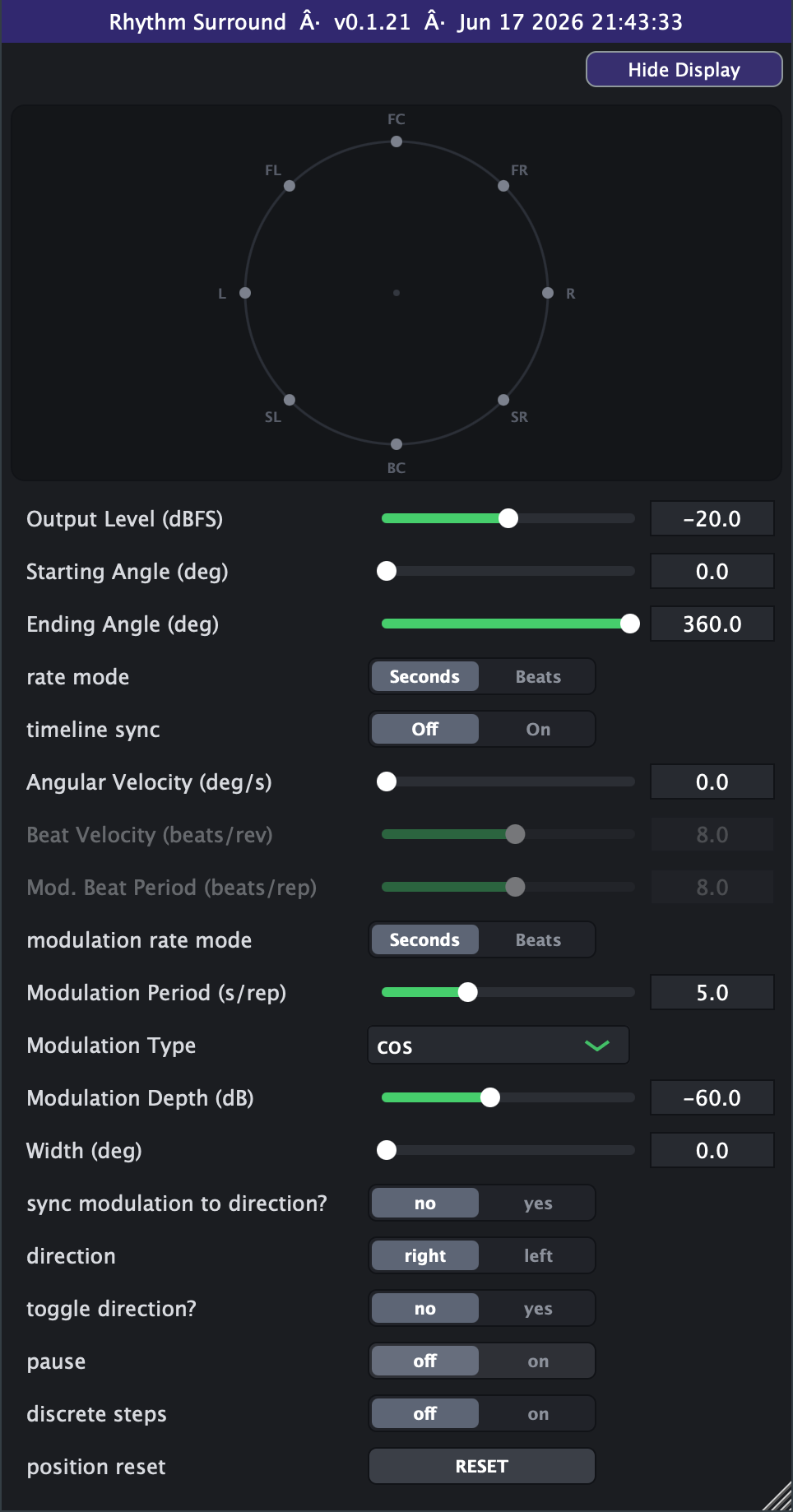
- Output Level (dBFS)
- Overall output level of the moving source. Higher is louder; this is the shared engine output gain (loudness compensation for Width is applied on top). Slider range is set on the Advanced tab (default -40..0 dB; extendable to -100..+20).
- Starting Angle (deg)
- Where the orbit begins on the ring (counter-clockwise: 0 = front, 90 = left, 180 = back, 270 = right). With Start 0 and End 360 the motion is a continuous, seamless circle.
- Ending Angle (deg)
- Where the sweep ends. The source travels from Start to End then snaps back (or bounces, if Toggle is on). Leave at 360 with Start 0 for a full continuous orbit.
- rate mode
- Chooses how orbit speed is set. Seconds uses Angular Velocity (deg/s); Beats derives the speed from Beat Velocity and the host project tempo so the spin locks to the song.
- Angular Velocity (deg/s)
- Orbit speed in degrees per second when Rate Mode is Seconds. 360 deg/s = one revolution per second; 0 holds still. Active only in Seconds mode. Slider range is set on the Advanced tab (default 0-720).
- Beat Velocity (beats/rev)
- Beats per full revolution when Rate Mode is Beats: smaller = faster spin. Combined with host tempo to set orbit speed. Active only in Beats mode. Slider range is set on the Advanced tab (default 0.1-400, log).
- modulation rate mode
- Chooses how the tremolo rate is set. Seconds uses Modulation Period (s/rep); Beats uses Mod Beat Period and host tempo to lock the pulse to the song.
- Mod. Beat Period (beats/rep)
- Beats per one tremolo cycle when Mod Rate Mode is Beats: smaller = faster pulse. Active only in Beats mode. Slider range is set on the Advanced tab (default 0.1-400, log).
- Modulation Period (s/rep)
- Seconds per one tremolo cycle when Mod Rate Mode is Seconds: smaller = faster pulse. Active only in Seconds mode (0 is treated as a tiny period internally).
- Modulation Depth (dB)
- How far the tremolo dips the level: this sets the linear floor the pulse drops to. Toward -6 is a shallow throb; toward -100 is a near-complete gate/chop. Slider range is set on the Advanced tab (default -60..-6 dB; extendable to -100..0, where 0 = no dip).
- Width (deg)
- Angular spread of the source. 0 is a tight point image; larger values fan it across up to 10 virtual sources around the centre, with automatic loudness compensation. Shared engine width control.
- sync modulation to direction?
- no = tremolo runs on its own clock. yes = the tremolo phase follows the rotation angle, so the pulse aligns with the source's position as it orbits.
- direction
- Direction of travel around the ring: CCW (counter-clockwise) or clockwise. Switching it snaps to the correct starting point so motion continues cleanly (either direction wraps through 360 as needed).
- toggle direction?
- no = sweep Start to End then snap back to Start. yes = bounce back and forth between Start and End, reversing at each end.
- pause
- on freezes the source at its current angle and stops the tremolo; off resumes motion. Useful for parking the sound at a fixed spot.
- position reset
- A momentary button: pressing it snaps the rotation back to the Starting Angle and triggers a short de-click crossfade.
- timeline sync (Advanced tab)
- On locks the rotation phase (and the tremolo, when Sync Mod is on) to the host playhead, so seeks, loops and stop/start move the motion to match the timeline. Off is free-running.
- Modulation Type (Advanced tab)
- Shape of the tremolo pulse: cos (smooth constant-power dip), ramp (triangular sweep), or raisedcos (1+cos, a softer rounded pulse).
- Advanced range settings
- Output Level's slider window defaults to -40..0 dBFS within hard bounds of -100..+20, always linear in dB. Angular Velocity defaults to 0-720 deg/s with a hard ceiling of 10000, linear by default with a log switch. Beat Velocity defaults to 0.1-400 beats/rev within hard bounds of 0.01-1024, logarithmic by default. Mod. Beat Period uses the same values as Beat Velocity: default 0.1-400 beats/rep within hard bounds of 0.01-1024, log by default. Modulation Depth defaults to -60..-6 dB within hard bounds of -100..0, always linear in dB. Min can never exceed max; the settings only reshape the on-screen sliders and save with your session or preset.
- discrete steps (Advanced tab)
- on quantizes each virtual-source angle to the nearest physical speaker (45 deg grid), giving a stepped/teleporting motion instead of smooth gliding.