Transient ripple
Pond
Transient-driven ripples that surge past you on every hit
Pond turns your mono sound into a wave that sweeps within the 8-speaker ring, but the motion only comes alive when the sound hits. Every onset (a drum hit, a plucked note, a stab) launches a ripple: the sound surges away from a starting point, races back and forth past the listener as fast as your settings allow, then slows and coasts to a stop until the next hit re-energises it. Quiet passages stay still; loud, percussive material sets the room rippling.
How to use it
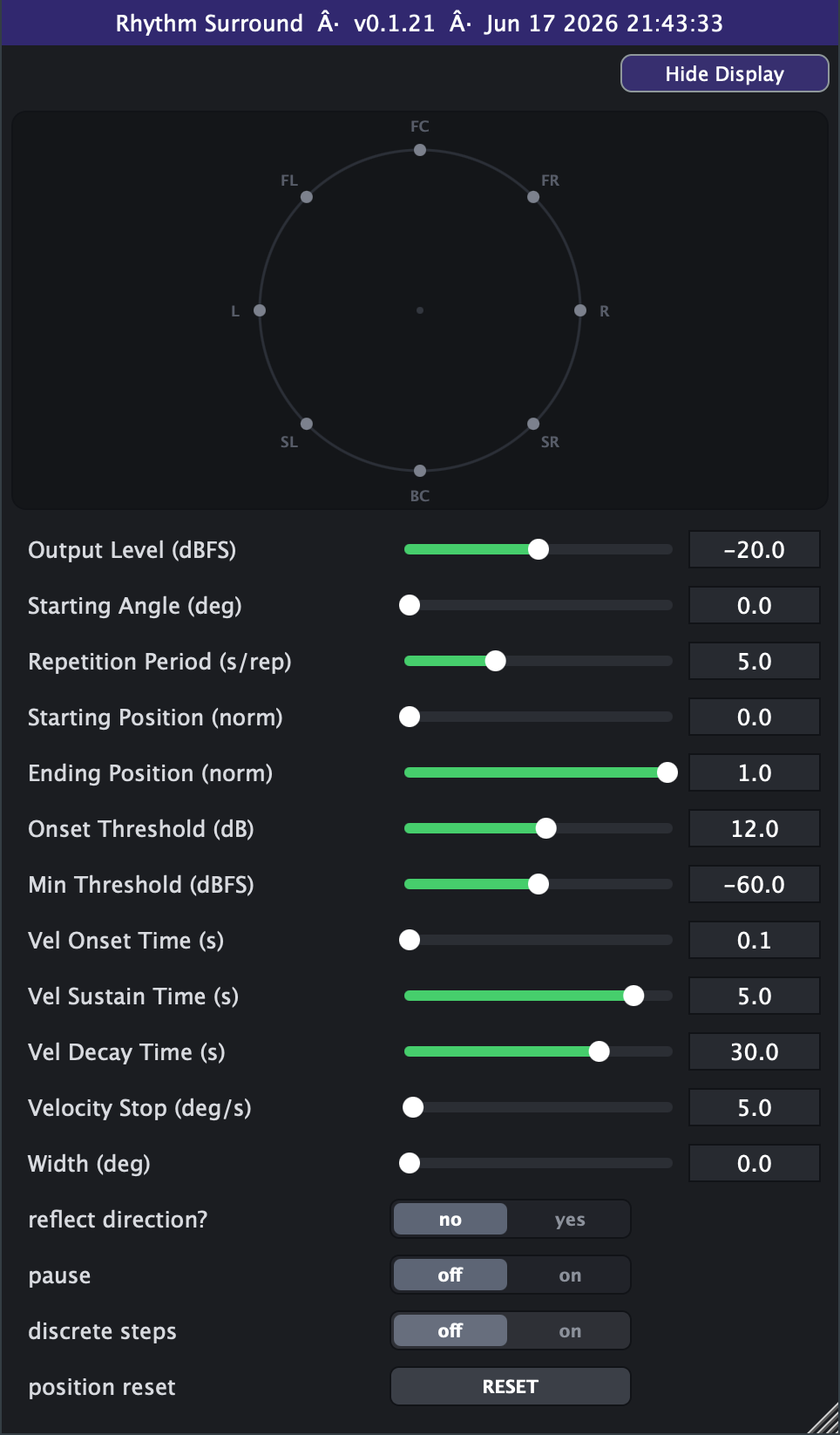
- Best on percussive, transient-rich material — drums, plucks, mallets, staccato synths. The motion is driven by hits, so sustained pads or legato vocals will barely move (they never cross the onset threshold).
- Start here: Repetition Period around 3-5 s for a clear surge, Onset Threshold 12 dB, Vel Onset Time fast (0.05 s) so each hit jumps straight into motion, Vel Sustain 2-5 s, Vel Decay 20-40 s for a long graceful coast-down.
- Tune the trigger with Onset Threshold + Min Threshold. If the room ripples on every tiny sound, raise Onset Threshold (more dB of jump required) and/or raise Min Threshold (ignore quiet input). If hard hits aren't triggering, lower them.
- Shape the ripple's lifetime with the four Velocity controls: Onset Time = how quickly a hit ramps up to full speed, Sustain Time = how long it holds full speed, Decay Time = how slowly it winds down, Velocity Stop = how slow it must get before the ripple is considered finished and a new hit can take over.
- Reflect = yes makes the wave bounce back and forth over a limited arc (set with Start/End Position) instead of snapping back to the start each lap — good for a rocking, tidal feel. With Start Position 0 and End Position 1 it just circulates fully.
- Width spreads the wave across more of the ring (0 = a tight pair of moving points; crank it up for a broad, enveloping swell). Loudness is auto-compensated as it widens.
- Pause = on freezes the wave wherever it is — handy to park the image, then release it on the next drop.
- Position reset is a momentary button: tap it to snap the wave back to its starting point and park it until the next hit (de-clicked). It works even while paused.
- Discrete steps = on quantises the motion to the 8 speaker positions for a stepped, teleporting feel instead of a smooth glide.
- Avoid expecting movement from non-transient sources, and don't set Velocity Decay extremely long with a fast Repetition Period unless you want the wave perpetually spinning — the ripple may never fully settle between hits.
Controls
- Output Level
- Overall output level of the spatialised signal. Lower it to sit Pond back in the mix; 0 dBFS is unity-ish (a built-in -6 dB allows for the dual mirror sources). Slider range is set on the Advanced tab (default -40..0 dB; extendable to -100..+20).
- Starting Angle
- The anchor point the wave radiates from and mirrors about. 0 = front/centre, 90 = left, 180 = behind, 270 = right (counter-clockwise). Move it to choose where the ripple is born.
- Repetition Period
- Sets the peak sweep speed: shorter = a faster, more frantic surge per hit; longer = a slow, lazy drift. This is the top speed a fresh onset ramps up to, not a fixed loop rate (Pond is hit-driven, not rhythmic). Slider range is set on the Advanced tab (default 5-15 s).
- Starting Position
- Where in the arc the wave begins, as a fraction of the available span (0 = at the Starting Angle). Sets the near edge of the wave's travel.
- Ending Position
- Where the wave travels to before snapping back (or bouncing, if Reflect is on), as a fraction of the span. 1 = full travel. Combine with Starting Position to confine the ripple to a slice of the ring.
- Width
- How wide the moving image is spread across the ring. 0 = a tight point pair; larger values fan the sound across more speakers for a broad, enveloping swell, with automatic loudness compensation.
- reflect direction?
- no = the wave snaps back to the start each lap (one-way surge); yes = it bounces back and forth across the Start/End arc (rocking, tidal motion). With Start 0 / End 1 it simply circulates fully.
- pause
- on = freeze the wave wherever it currently is (motion stops, hits no longer move it); off = normal hit-driven motion.
- position reset
- Momentary trigger: tap to snap the wave back to its starting position. The jump is de-clicked. Works even while paused.
- timeline sync (Advanced tab)
- A re-cue switch (Pond's motion is hit-driven, so it can't be phase-locked): On means a loop wrap or seek snaps the ripple back to its starting position (de-clicked) and parks it until the next hit, so looped playback reproduces identically; Off (the default) is the faithful free-run.
- Onset Threshold (Advanced tab)
- How big a level jump above the running noise floor counts as a hit. Higher = only strong transients trigger a ripple; lower = the wave reacts to subtler events.
- Min Threshold (Advanced tab)
- Absolute quiet gate: input below this level can never trigger a ripple, no matter how it jumps. Raise it to stop low-level noise or bleed from setting the room in motion.
- Vel Onset Time (Advanced tab)
- How long a hit takes to ramp from standstill up to full sweep speed. Short = the wave leaps into motion on the attack; long = a slow build after each hit.
- Vel Sustain Time (Advanced tab)
- How long the wave holds at full speed after ramping up, before it starts winding down. Longer = the ripple keeps racing for more time after each hit.
- Vel Decay Time (Advanced tab)
- How slowly the wave coasts to a stop after the sustain. Long values give a graceful, drawn-out slowdown; short values make the motion die quickly between hits.
- Velocity Stop (Advanced tab)
- The speed below which the ripple is considered finished, freeing the next hit to re-trigger. Higher = the wave cuts off sooner (more obviously per-hit); lower = it crawls almost to a halt before resetting.
- Advanced range settings
- Output Level min / max reshape the level slider's window (defaults -40 and 0 dBFS, hard bounds -100 and +20; always linear in dB). Repetition Period min / max / scale reshape the period slider's window (defaults 5 and 15 s, hard bounds 0 and 1000; linear by default with a log switch). Min can never exceed max, and the range settings only reshape the on-screen sliders and save with your session or preset.
- discrete steps (Advanced tab)
- on = quantise the motion to the 8 speaker positions (45 deg steps) for a stepped, teleporting feel; off = smooth gliding motion.